
Developer API and DTF Halftone
At a glance
| Topic | Details |
|---|---|
| Best for | Teams that want API keys, request history, and a supported public DTF halftone endpoint. |
| Start here | Open the API console if you need keys or usage. Open the docs if you need the schema and OpenAPI reference first. |
| Outcome | A safer backend integration with clearer auth, fewer request-shape surprises, and better debugging. |
Open it now
Before you start
- Developer API access currently requires a Pro or Enterprise subscription.
- The plaintext API key is shown only once when you create it.
- Today, the documented public execution endpoint is
POST /api/v1/dtf-halftone.
Plan requirement
- The developer surface is gated to Pro and Enterprise accounts.
- Lower plans see an upgrade state instead of the full console and docs.

Show the gate clearly so users understand this is a plan requirement, not a broken route.
What is available today
| Surface | What it is for | What to expect today |
|---|---|---|
| API Console | Create keys, inspect usage, and review files from the signed-in web app. | Lives at /app/api and is plan-gated. |
| API Docs | Read the OpenAPI reference and schema details. | Lives at /app/api/docs and is also plan-gated. |
| OpenAPI YAML | Use the raw schema in tooling or internal docs. | Lives at /openapi/designgen-developer-v1.yaml. |
| Public execution endpoint | Run DTF halftone processing from your backend. | Today this is POST /api/v1/dtf-halftone. |
The public endpoint to know first
- POST /api/v1/dtf-halftone is the main public processing endpoint currently documented for developers.
- It accepts an
imageUrlplus optionaldtfHalftone,dtfHalftoneAngle, andsessionIdvalues. - It authenticates with either a Firebase ID token or a developer API key in the
Authorization: Bearer ...header. - The
imageUrlmust be a valid HTTPS URL.
Recommended setup flow
- Confirm the account is on Pro or Enterprise.
- Create a key in the API Keys tab.
- Give the key a clear name.
- Choose only the scopes you need.
- Copy the key immediately, because the plaintext key is shown once.
- Test the public halftone endpoint from your backend, not from client-side code.
- Check the Usage tab after the first request.
- Use the Files tab and usage history if you need to inspect output assets or request metadata.
Current scope names shown in the UI
- dtf_halftone for the public halftone endpoint.
- usage_read is shown in the scope picker but reserved for future usage APIs.
- files_read is shown in the scope picker but reserved for future file APIs.
- * for full current and future scope coverage in trusted environments only.
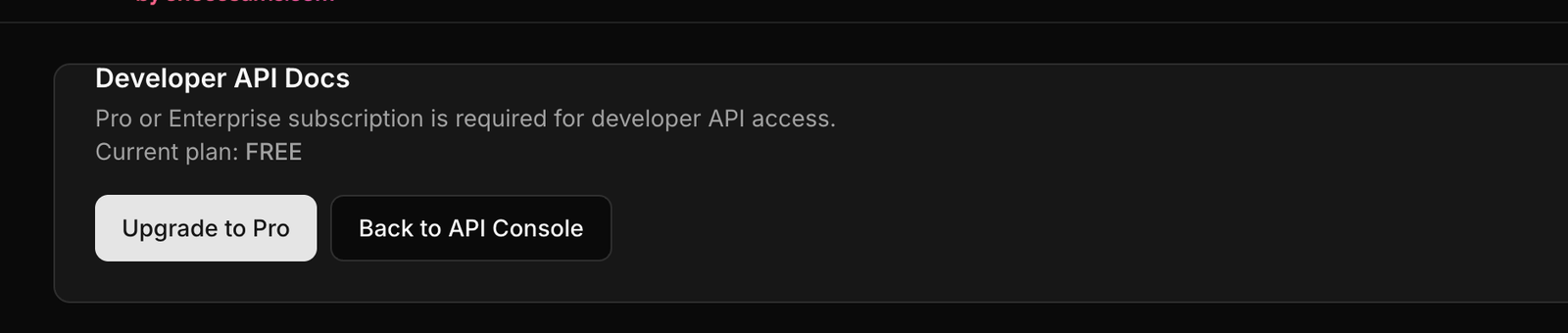
The docs route is gated too, so users on lower plans do not mistake the upgrade state for a docs outage.
Authentication options
| Method | Use it when | Notes |
|---|---|---|
| Developer API key | Your backend service calls the endpoint directly. | Requires the right scope, usually dtf_halftone. |
| Firebase ID token | A signed-in first-party app is calling with the user’s auth context. | Still subject to developer-access and token-balance checks. |
Request example
curl -X POST "https://your-domain.com/api/v1/dtf-halftone" \
  -H "Authorization: Bearer YOUR_API_KEY" \
  -H "Content-Type: application/json" \
  -d '{
    "imageUrl": "https://example.com/input.png",
    "dtfHalftone": 40,
    "dtfHalftoneAngle": 90,
    "sessionId": "optional-session-id"
  }'
JavaScript example
const response = await fetch("https://your-domain.com/api/v1/dtf-halftone", {
  method: "POST",
  headers: {
    "Content-Type": "application/json",
    Authorization: "Bearer " + process.env.DESIGNGEN_API_KEY,
  },
  body: JSON.stringify({
    imageUrl: "https://example.com/input.png",
    dtfHalftone: 40,
    dtfHalftoneAngle: 90,
  }),
});

const data = await response.json();
Response example
{
  "success": true,
  "imageUrl": "https://storage.example.com/dtf-halftone-output.png",
  "processingType": "dtf-halftone",
  "tokenCost": 1,
  "metadata": {
    "requestId": "req_123",
    "dtfHalftone": 40,
    "dtfHalftoneAngle": 90,
    "cacheHit": false
  }
}
Common errors
| Status | Code or cause | What it usually means |
|---|---|---|
| 400 | Invalid request payload | The JSON is malformed or one of the fields failed validation. |
| 400 | imageUrl must use https | The endpoint rejects non-HTTPS image URLs. |
| 401 | Unauthorized | The bearer token or API key is missing, invalid, or expired. |
| 403 | Pro or Enterprise required | The account does not have developer API access. |
| 403 | Insufficient scope | The API key does not include dtf_halftone. |
| 402 | Insufficient tokens | The account does not have enough tokens to run the request. |
Security rule: Do not place a developer API key in client-side code. Keep it on your backend.
Console versus public API: The signed-in web console can show usage and files already, even though
usage_readandfiles_readare still reserved as future public API scopes.
Example: Backend processing for production art
A team stores approved art in its own system, then sends the image URL to the DTF halftone endpoint from a server job.
- The backend loads the stored API key from a secure secret store.
- It posts the image URL and halftone settings to the public endpoint.
- It saves the output URL from the response.
- The team reviews usage and output files from the API console if anything looks wrong.
Visual walkthrough

Use the console to create keys, inspect usage, and confirm which developer features are available to the account.

The header is the quickest way to verify you are in the console and not the docs or a gated upsell view.

The docs view is where request shapes and endpoint details are easiest to inspect before you write integration code.